Topic: Account Identity | Product: Flinks Connect, API | Effort: API integration required
/GetAccountsDetail API response (tied to the specific bank account). These two values can differ. Always use the API response — not the Dashboard — for identity verification, KYC, or KYB purposes.In this article
| # | Section | What you'll find |
|---|---|---|
| 1 | The Two Sources Explained | Dashboard (CDB) vs. /GetAccountsDetail API |
| 2 | How to Identify the Right Name | Using AccountType to filter business vs. personal |
| 3 | Quick Reference | Which source and field to use per scenario |
| 4 | Important Caveats | Availability limits and data source notes |
The Two Sources Explained
Source 1 — Flinks Client Dashboard (CDB)
The Dashboard's Customer Information panel shows a single "Name" field under the login. This is the retail card owner — the individual whose credentials were used to authenticate with the financial institution.
Figure 1 — Flinks Client Dashboard: the "Name" field reflects the retail card owner (login holder), not the bank account owner.
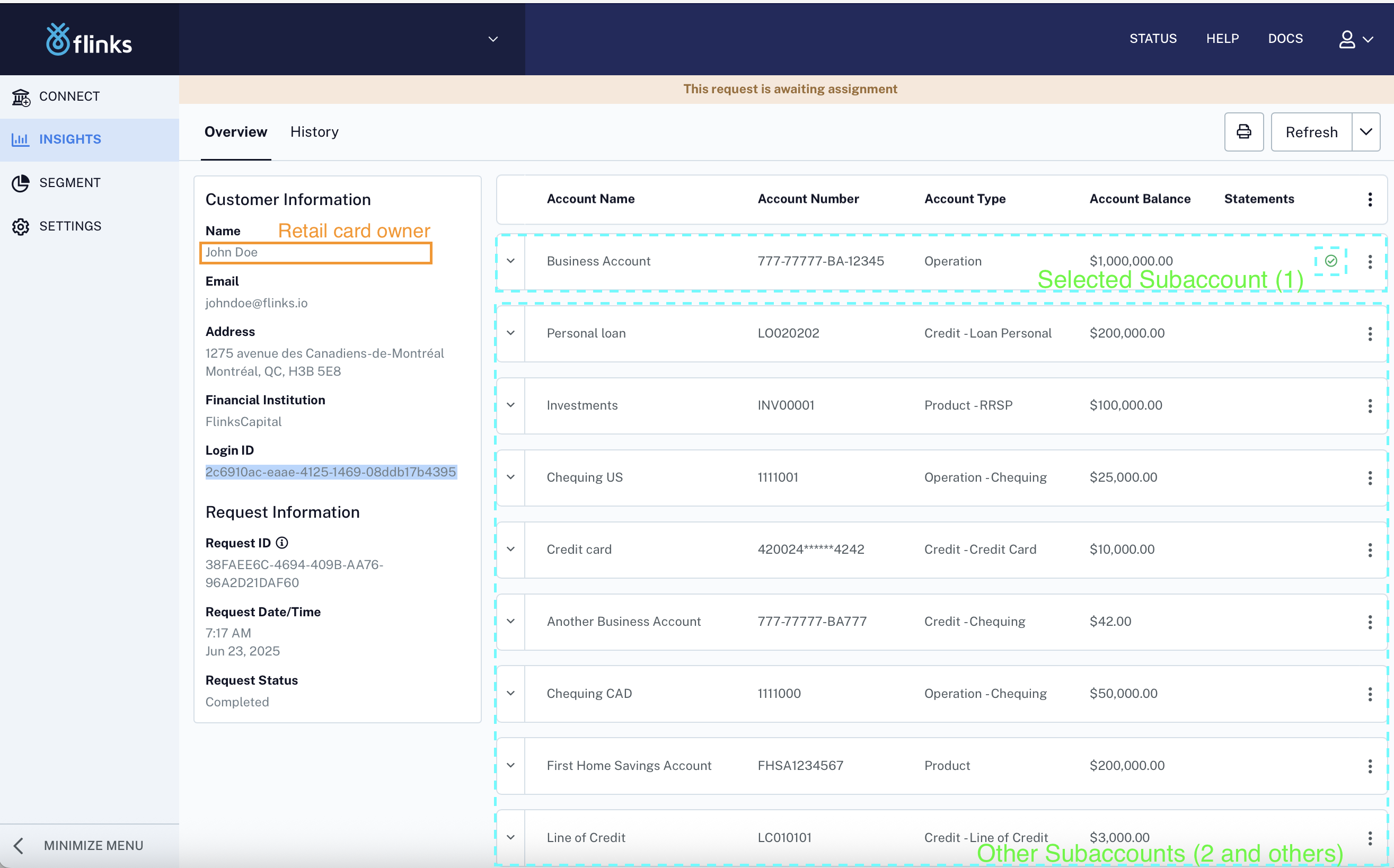
- This name is tied to the login, not to any individual account
- If a business owner logs in with personal credentials, the name shown is the individual's name — even if business accounts are present
- Do not use this field for programmatic KYC or KYB — it is a display convenience, not a data source
AccountType. This field is only available via the API.Source 2 — /GetAccountsDetail API Response
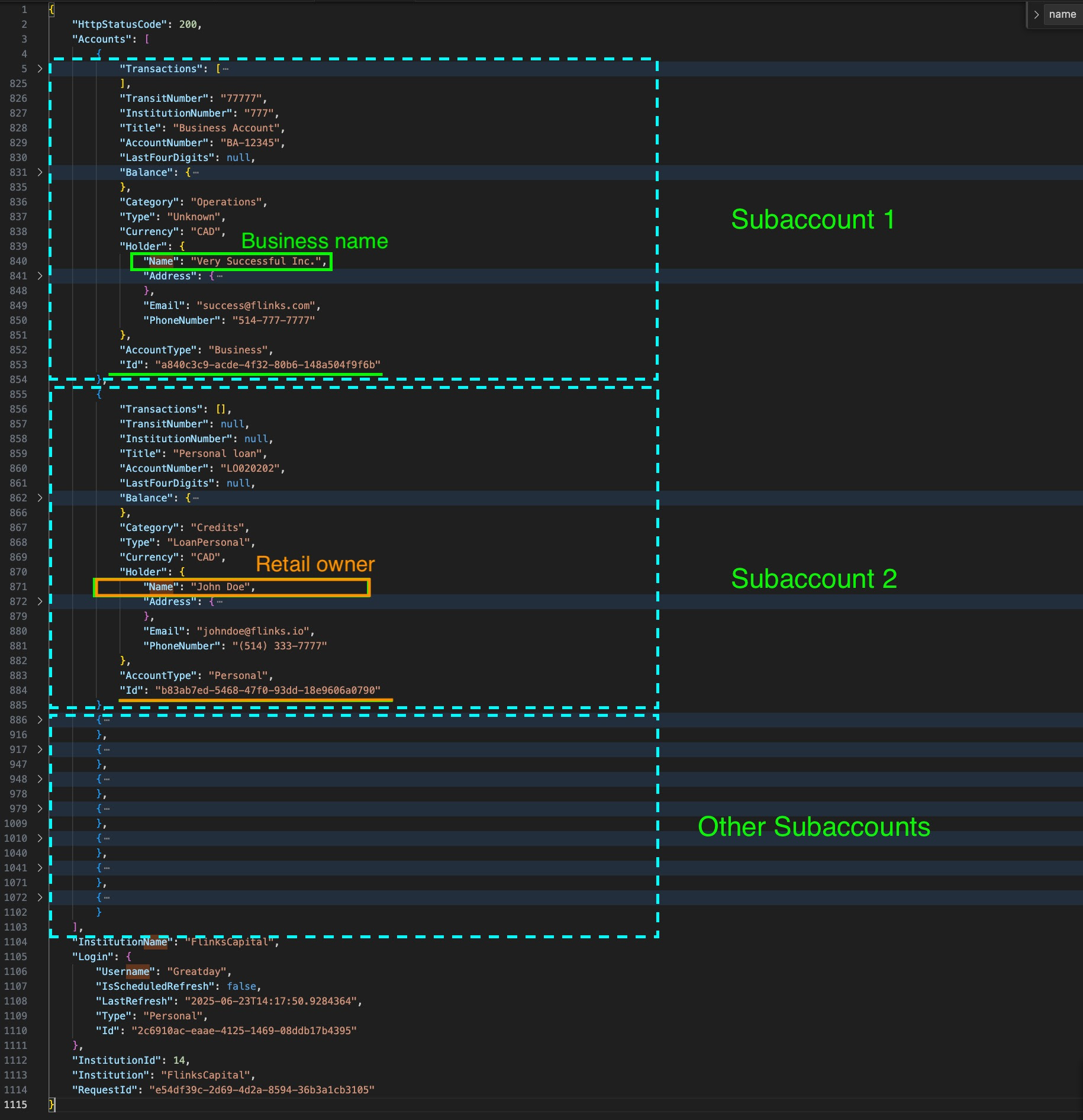
The GAD response returns an Accounts array. Each subaccount includes a Holder object with the name, address, email, and phone specific to that account as reported by the financial institution.
{
  "Accounts": [
    {
      "Title": "Business Account",
      "AccountNumber": "BA-12345",
      "AccountType": "Business",
      "Holder": {
        "Name": "Very Successful Inc.",
        "Email": "success@flinks.com",
        "PhoneNumber": "514-777-7777"
      }
    },
    {
      "Title": "Personal loan",
      "AccountNumber": "L020202",
      "AccountType": "Personal",
      "Holder": {
        "Name": "John Doe",
        "Email": "johndoe@flinks.io",
        "PhoneNumber": "(514) 333-7777"
      }
    }
  ]
}
Figure 2 — GAD payload: each subaccount has its own Holder.Name and AccountType. Business accounts return the business entity name; personal accounts return the individual name.
How to Identify the Right Name
Use AccountType to Filter
Each subaccount in the GAD response includes an AccountType field:
AccountType value | Holder.Name returns |
|---|---|
"Business" | Business entity name (e.g., "Very Successful Inc.") |
"Personal" | Individual account holder name (e.g., "John Doe") |
AccountType values and different Holder.Name values. Always iterate through the full Accounts array and filter by AccountType rather than assuming a single name applies to all subaccounts.The Holder Object Structure
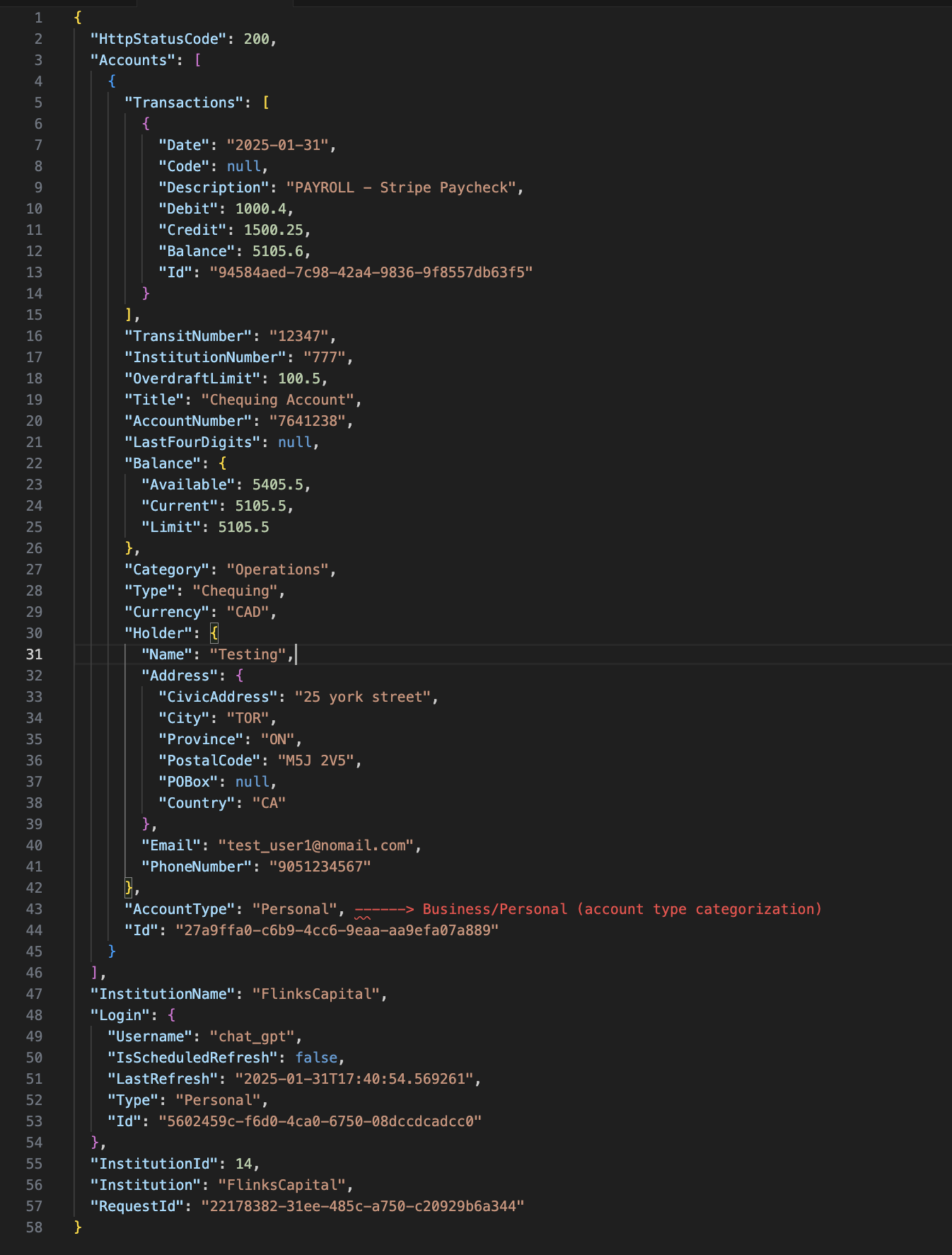
"Holder": {
  "Name": "string",
  "Address": {
    "CivicAddress": "string",
    "City": "string",
    "Province": "string",
    "PostalCode": "string",
    "POBox": "string | null",
    "Country": "string"
  },
  "Email": "string",
  "PhoneNumber": "string"
}
Figure 3 — GAD payload: location of the Holder object within each account entry.
Quick Reference
| Scenario | Correct Source | Field |
|---|---|---|
| Display a name in your UI for reference | CDB or API | Holder.Name |
| Verify individual account holder identity (KYC) | /GetAccountsDetail | Holder.Name where AccountType == "Personal" |
| Retrieve business entity name (KYB) | /GetAccountsDetail | Holder.Name where AccountType == "Business" |
| Distinguish between business from personal account | /GetAccountsDetail | AccountType |
Important Caveats
- Availability depends on the institution. Not all banks expose a separate business name. In some cases, even a business account may return an individual name in
Holder.Name. This is a bank-side limitation, not a Flinks limitation. - The name reflects the bank's data. Flinks returns what the financial institution provides — it is not normalized or enriched.
- The Dashboard name is for support and monitoring only. It is not suitable as a data source for identity or ownership verification in production integrations.
AccountTypeis API-only. The Client Dashboard does not expose this field.
Related Resources
Was this article helpful?
That’s Great!
Thank you for your feedback
Sorry! We couldn't be helpful
Thank you for your feedback
Feedback sent
We appreciate your effort and will try to fix the article