Flinks Integration Flows: Standard vs. Webhook
Topic: Step-by-step walkthrough of the Flinks Connect standard polling flow and webhook-based integration flow | Product: Flinks Connect · API · Webhooks | Effort: Shared Phase 1; diverge at back-end data retrieval strategy
Overview: Flinks supports two back-end integration patterns after a user connects via Flinks Connect. The Standard Flow has your server poll the Flinks API for account data. The Webhook Flow has Flinks push data to your server automatically — no polling required. Both flows share the same Phase 1 front-end authentication. Phase 3 (Attributes API) is optional in both flows and always requires an on-demand API call.
In this article
| # | Section | What you'll find |
|---|---|---|
| 1 | Standard Integration Flow | Flinks Connect + polling API — Phase 1, 2, and 3 |
| 2 | Webhook Integration Flow | Flinks Connect + webhook back-end — Phase 1, 2, and 3 |
| 3 | Flow Comparison | Side-by-side differences across all phases |
| 4 | Quick Reference — Key Endpoints | Endpoint summary table |
| 5 | Related Resources | Links to Flinks documentation |
1. Standard Integration Flow
Flinks Connect + API · Retail Financial Institutions · Corrected Flow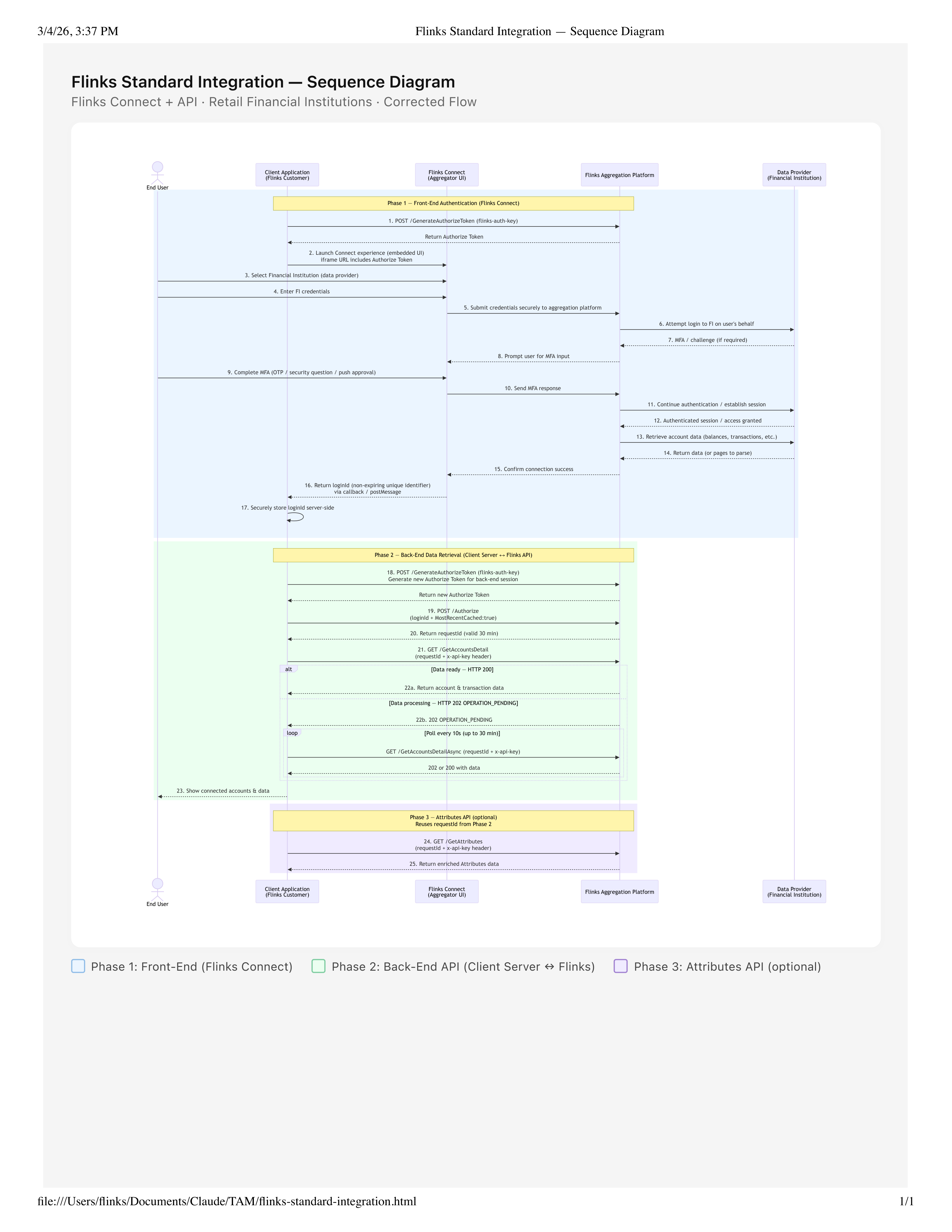
Phase 1: Front-End (Flinks Connect)
Phase 2: Back-End API (Client Server ↔ Flinks)
Phase 3: Attributes API (optional)
2. Webhook Integration Flow
Flinks Connect + Webhook Back-End · Retail Financial Institutions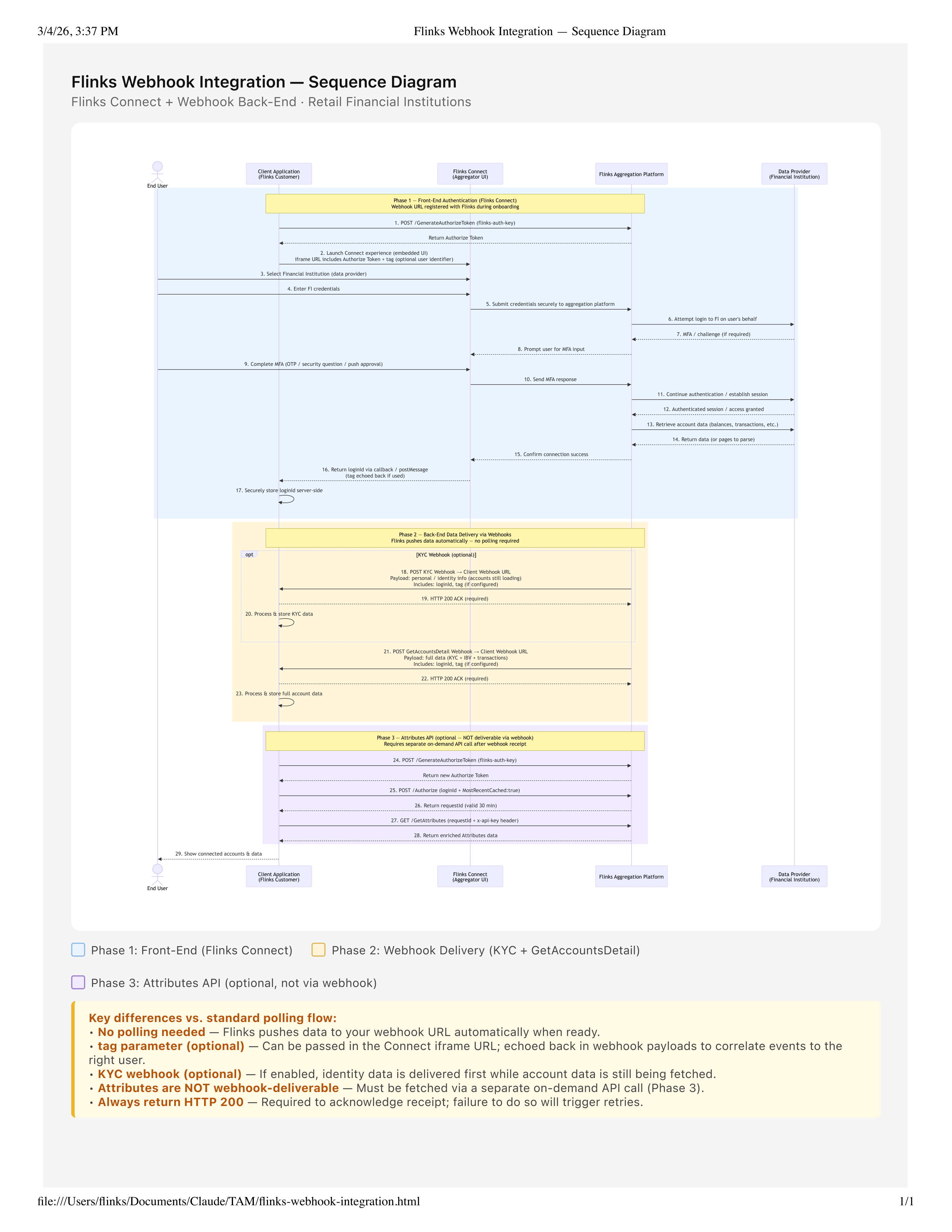
Phase 1: Front-End (Flinks Connect)
Phase 2: Webhook Delivery (KYC + GetAccountsDetail)
Phase 3: Attributes API (optional, not via webhook)
Key differences vs. standard polling flow:
• No polling needed — Flinks pushes data to your webhook URL automatically when ready.
• tag parameter (optional) — Can be passed in the Connect iframe URL; echoed back in webhook payloads to correlate events to the right user.
• KYC webhook (optional) — If enabled, identity data is delivered first while account data is still being fetched.
• Attributes are NOT webhook-deliverable — Must be fetched via a separate on-demand API call (Phase 3).
• Always return HTTP 200 — Required to acknowledge receipt; failure to do so will trigger retries.
• No polling needed — Flinks pushes data to your webhook URL automatically when ready.
• tag parameter (optional) — Can be passed in the Connect iframe URL; echoed back in webhook payloads to correlate events to the right user.
• KYC webhook (optional) — If enabled, identity data is delivered first while account data is still being fetched.
• Attributes are NOT webhook-deliverable — Must be fetched via a separate on-demand API call (Phase 3).
• Always return HTTP 200 — Required to acknowledge receipt; failure to do so will trigger retries.
3. Flow Comparison
| Standard Flow | Webhook Flow | |
|---|---|---|
| Phase 1 | Identical | Identical |
| Phase 2 mechanism | Client polls Flinks API | Flinks pushes to client endpoint |
| Polling required | Yes — every 10s, up to 30 min | No |
| Webhook URL required | No | Yes — registered at onboarding |
| KYC / identity early delivery | No — all data returned together | Yes — optional KYC webhook |
tag parameter | Not applicable | Optional — echoed in all payloads |
| HTTP 200 ACK required | No | Yes — for each webhook received |
| Phase 3 — Attributes API | Reuses requestId from Phase 2 | Requires new GenerateAuthorizeToken → Authorize → GetAttributes |
| Attributes via webhook | Not available | Not available |
| Back-end complexity | Polling loop + timeout handling | Webhook receiver + ACK logic |
4. Quick Reference — Key Endpoints
| Endpoint | Method | Phase | Description |
|---|---|---|---|
/GenerateAuthorizeToken | POST | 1, 2, 3 | Generate an Authorize Token using flinks-auth-key |
/Authorize | POST | 2, 3 | Exchange loginId for a requestId (30 min TTL) |
/GetAccountsDetail | GET | 2 (Standard) | Retrieve account and transaction data; returns 200 or 202 |
/GetAccountsDetailAsync | GET | 2 (Standard) | Poll for data when initial call returned 202; every 10s up to 30 min |
/GetAttributes | GET | 3 (Both) | Retrieve enriched Attributes data; requires active requestId |
5. Related Resources
Was this article helpful?
That’s Great!
Thank you for your feedback
Sorry! We couldn't be helpful
Thank you for your feedback
Feedback sent
We appreciate your effort and will try to fix the article